Controlled test specification · Adaptable guidance
Outstanding Tiny Desk AI Prompt for Photo-to-Video Tiny Desk concert Clips
Copy an adaptable Outstanding Tiny Desk AI video prompt for an image-to-video model, understand what this Tiny Desk concert AI prompt can and cannot control, and compare it with Outstanding Tiny Desk AI’s guided preset workflow.
Copy the 8-second photo prompt
Attach one clear photo of an authorized adult through a reference image, appearance image, first-frame, or image-to-video input. The prompt describes one solo desk performance in a continuous vertical shot.
Use the adult in my uploaded photo as the featured Lead Singer in an intimate bookshelf office concert. Keep their recognizable face, hairstyle, body proportions, and visible clothing consistent throughout.

Create a fictional 8-second vertical 9:16 soulful Tiny Desk style concert video. Show the Lead Singer stepping up to a vintage broadcast microphone in front of packed floor-to-ceiling bookshelves, belting an emotional R&B vocal hook, breaking into a joyful mid-song laugh, and grooving with a red keyboardist and saxophonist behind the desk.

Use warm studio desk lighting and natural handheld documentary camera movement. Avoid sudden outfit changes, extra fingers, duplicate microphones, unreadable text, network logos, captions, and the likeness of any unauthorized public figure.
Test status: one controlled APIMart Wan 3.0 output was completed on October 27, 2026. The text is free to copy, but cost, duration, watermarks, audio, and input behavior depend on the selected video service. See the input and actual output.
A compatible model interprets the scene and action; results vary.
The public form uses a desk play, photo roles, Stage vibe, and quality instead of a written prompt.
02 · Controlled test record
What happened in the controlled Outstanding Tiny Desk AI prompt test?
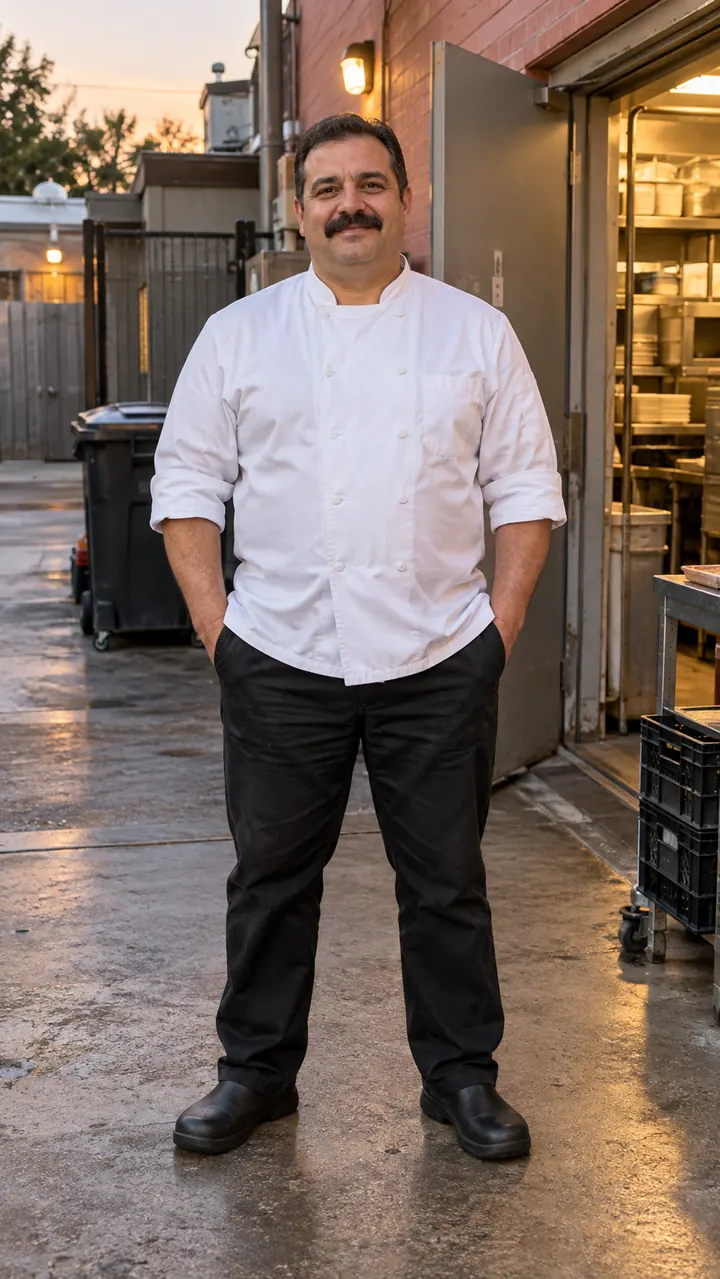
This Outstanding Tiny Desk AI prompt was submitted once through Outstanding Tiny Desk AI’s APIMart adapter on October 27, 2026. It used the exact eight-second prompt above and the AI-generated fictional adult chef portrait shown here. The request used 9:16, Standard 480p, no reference video, and model-generated audio turned off. The video below is the actual downloaded result from that task.
| Video service | APIMart Wan 3.0 official model page · model wan3.0-video |
|---|---|
| Input and prompt | One fictional chef portrait plus the exact eight-second prompt shown above; no reference video |
| Output settings | 9:16 · 8 seconds · 480p · model-generated audio off · one submission |
| Provider task | task_01M5YM3AZPHMTE7XHF6M44446Z · submitted 12:06:59 UTC · completed 12:09:12 UTC |
| Provider charge | 2.6304 APIMart credits, reported as $0.26304 for this run. These are provider billing units, not Outstanding Tiny Desk AI product credits. |
| Public result status | Completed and accepted for this single test. This does not establish a success rate, cross-model compatibility, or a “best prompt” claim. |
What we observed
- Identity: one chef remains visible throughout; the face, mustache, white jacket, and black trousers stay recognizable.
- Action: the continuous shot shows the singer approaching the microphone, belting a note, laughing, and grooving.
- Frame: the microphone and bookshelf set remain readable, with no extra performer, duplicate instrument, visible brand, caption, or watermark.
- Limits: one accepted result cannot prove repeatability. Hand, instrument, face, clothing, and setting details can change in another generation.
The task completed in about two minutes and fourteen seconds, but that single elapsed time is not a generation-speed promise. The six-second and reference-video prompt variants were not tested.
03 · A shorter experiment
Try one compact desk performance in six seconds
If the external tool does not offer eight seconds, reduce the job to one continuous microphone approach, vocal hook, and joyful laugh. This shorter version removes extra action so the model has fewer moving parts to interpret.
Use the adult in my uploaded photo as the only featured Lead Singer at a cozy bookshelf concert desk. Keep their recognizable face and visible clothing consistent.

Create one continuous 6-second vertical 9:16 shot in front of warm bookshelves and vinyl records. The singer leans into a vintage condenser microphone, belts a soulful high note, and breaks into a big warm laugh as the band grooves behind them. Avoid cuts, duplicate mics, extra limbs, logos, captions, and unauthorized public-figure likenesses.
Not separately tested. Reducing the number of actions may make the request easier to interpret, but it does not guarantee a more stable result. Check the service’s duration and reference-image behavior before spending credits.
04 · Start with your photo
How do you use an Outstanding Tiny Desk AI prompt?
- 01
Choose a compatible input mode
The documented route is APIMart Wan 3.0. Other services may call the image input a reference image, appearance image, first frame, or image-to-video input. A text-only mode receives no photo.
- 02
Attach one clear, authorized photo
Choose one adult with a visible face and body. Keep the image attached as an actual input; writing “my uploaded photo” cannot provide an image by itself.
- 03
Paste the prompt and set the format
Select vertical 9:16 and the requested duration when available. Do not assume every model supports the same resolution, length, audio, or reference controls.
- 04
Review the whole output
Check the face, clothing, hands, microphone, instruments, logos, and captions. Another render may differ and may cost credits in the external tool.
Outstanding Tiny Desk AI’s own public form uses guided choices rather than a written prompt: desk play, photo roles, Stage vibe, and quality.
05 · What the inputs control
Why can two Outstanding Tiny Desk AI prompts produce different videos?
A reference photo can guide appearance while text describes action and camera. Without a video reference, the model must invent timing, hand motion, instrument placement, stage geometry, and transitions. More detail can narrow the request, but it cannot lock every frame.
The guided product route separates those decisions into explicit controls. Read the Outstanding Tiny Desk AI video tutorial for the photo, desk play, Stage vibe, and quality workflow.
| Input | Photo + text elsewhere | Guided creator on this site |
|---|---|---|
| Featured people | One attached appearance reference unless the tool supports more | One Lead Singer, or a Lead Singer and optional Sax / Bandmate depending on the play |
| Action and camera | Described in words and interpreted by the model | A selected play defines the intended movement and duration |
| Setting | Described in words | Auto or a named Stage vibe option |
| Quality | Depends on the external tool | Standard 480p or HD 720p |
| Written prompt | Required for this route | Not required in the public form |
| Reference video | Not used in the documented photo + text setup | Not uploaded by the user |
| Duration | Requested in text and settings; support depends on the service | Fixed at 10, 15, or 8 seconds by the selected play |
| Sound | Depends on the external model; the documented setup turns model-generated audio off | Authorized template audio is included in the final MP4 |
| Cost evidence | External service pricing applies | 50 credits for 480p or 100 credits for 720p |
| Evidence | One controlled APIMart Wan 3.0 input-to-output result, with its exact prompt and settings shown above | Accepted product samples and the current product contract |
06 · If your tool supports two references
What if you can upload a reference video too?
Some tools can accept a video for motion and camera plus a photo for the lead subject’s appearance. Confirm that the selected model supports both inputs together. A video upload alone does not mean the model can replace its subject.
Use the uploaded video only as the action and camera master, and the uploaded photos as the appearance references for the Lead Singer (Image1) and optional Featured Saxophonist / Bandmate (Image2). Replace the source performers from the first frame through the last while keeping each uploaded person's face, hairstyle, body proportions, and clothing consistent through the center-mic vocal hook, mid-song laugh, red keyboard cut, and saxophone solo.

Follow the reference video's exact camera timing and stage blocking inside a warm bookshelf concert office without copying source logos, captions, or original faces.
What the action reference contributes
A suitable reference can show the order of the mic turn, vocal close-up, laugh, sax break, and finale, plus the camera distance. The prompt clarifies which subject to replace and which visible features to preserve.
Not tested in this review. Use only a performance video you are authorized to upload. This is adaptable wording, not confirmation that any particular service supports appearance replacement or that a public trend video may be downloaded and reused.
07 · Judge the whole clip
What should you check before another attempt?
Review the full result before changing this Outstanding Tiny Desk AI prompt. Identify one visible problem, then make the smallest relevant adjustment. These changes may help a later attempt, but they do not guarantee a fix.
The face or outfit changes
Try reducing turns and requests that hide the face. Remove conflicting clothing descriptions. These changes cannot lock identity through occlusion.
The hands or instrument deform
Try reducing simultaneous action and requesting one visible instrument. Dense hand-key or hand-microphone contact can still create artifacts.
The camera cuts or jumps
Try reinforcing “one continuous shot” and remove extra angle or montage instructions. The model may still introduce a transition.
The stage or finale is unclear
Try adding “keep the center microphone and bookshelf desk visible throughout the performance.” Another render is not guaranteed to correct the framing.
Badges or sponsor text appear
Try removing real broadcaster, venue, and branded wardrobe descriptions. Do not publish an output with unwanted marks or misleading text.
The second person is wrong
Return to the solo prompt or use a model that explicitly supports multiple reference people. Do not infer multi-person identity control from a generic image-to-video input.
08 · Direct answers
Outstanding Tiny Desk AI prompt questions
What is an Outstanding Tiny Desk AI prompt?
It is written guidance for an AI video model covering the subject, Tiny Desk concert action, camera, format, and unwanted artifacts. Attach a photo separately when the person’s appearance matters.
Is this an Outstanding Tiny Desk AI video prompt?
Yes. The main version is an eight-second photo-to-video prompt for one fictional Tiny Desk concert performance. It is adaptable guidance, not a promise of identical results.
Which tool was this prompt tested with?
It was tested once with APIMart Wan 3.0 using one AI-generated fictional chef portrait, the exact eight-second prompt on this page, 9:16, 480p, no reference video, and model-generated audio off. The actual output is shown here; one result does not establish repeatability or cross-model compatibility.
Can I use it in another model?
You can adapt the wording when the selected model accepts both a reference image and text. Compatibility, duration, resolution, audio, cost, and reference behavior must be checked in that service.
Do I need to attach a photo?
Yes when you want the output to resemble a particular authorized adult. Writing ‘my uploaded photo’ does not provide an image unless the file is attached through a supported reference-image input.
Does the prompt generate sound?
The text does not guarantee sound. Audio behavior depends on the external model and its settings. The documented Wan 3.0 setup keeps model-generated audio off so the visual result can be reviewed separately.
Is copying the prompt free?
Yes. Copying the text is free, but an external service may charge for generation, retries, higher resolution, or longer duration.
Can it preserve my face exactly?
No exact identity match is promised. The photo, reference mode, turns, occlusion, body contact, and video model can all change facial or clothing details.
Can I use a reference video?
Only if the chosen service supports photo and video references together and you are authorized to upload both files. A video upload alone does not prove that subject replacement is supported.
What should I change when hands or instruments look wrong?
Reduce simultaneous motion, keep the microphone or instrument clearly visible, and simplify the gesture. These are input adjustments to try, not guaranteed fixes.
About this page
What is verified here?
The action reference verifies the target solo performance sequence. The separate controlled test verifies one actual input, exact prompt, APIMart Wan 3.0 task, and output. The downloaded result passed the visible review described above. It does not prove repeatability, compatibility with another model, a success rate, or a “best prompt.”
Only upload photos or videos you are authorized to use. The action clip is product reference material and does not establish an input-to-output relationship with any uploaded portrait.
Prefer guided controls?
Choose a play.
Skip the prompt.
Use one or two authorized photos, select the intended desk play, choose the Stage vibe and quality, then review the setup before submitting.
Open the Outstanding Tiny Desk AI generator